
Xbox Elite Controllers
Last updated: August 22, 2026
More than six years after its release, the Xbox Elite Controllers Series 2 remains Microsoft’s flagship premium controller. While newer competitors have entered the market, it continues to stand out because of its deep customization, comfortable design, long battery life, and excellent compatibility with Xbox consoles and Windows PCs.
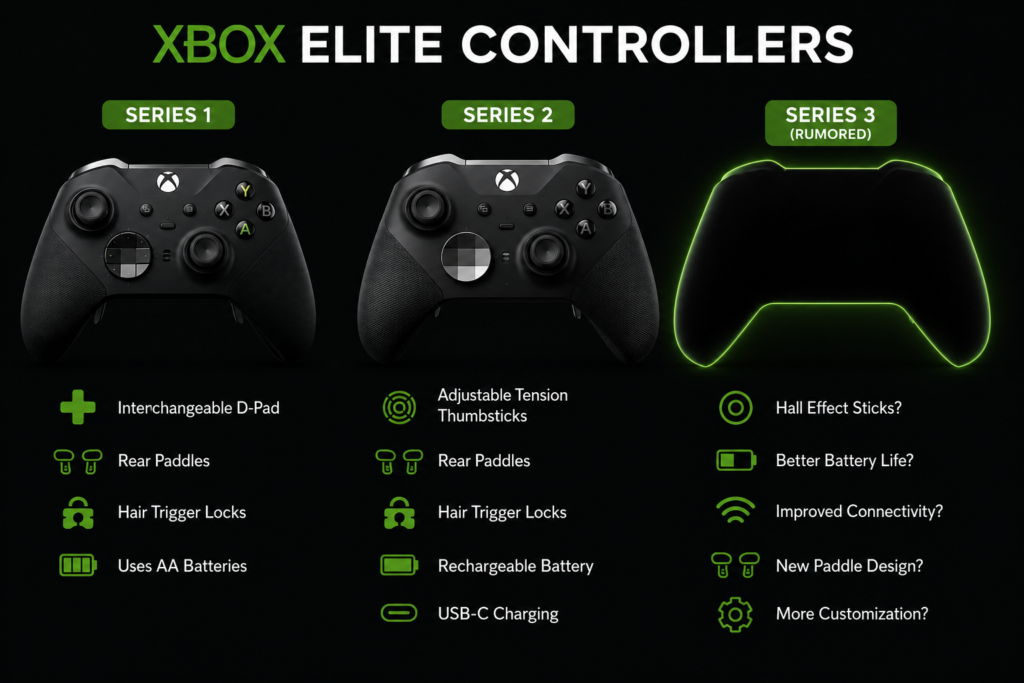
Rather than adding features just for marketing, Microsoft focused on improving the parts that competitive players use every day. Adjustable-tension thumbsticks, rear paddles, shorter hair trigger locks, and customizable profiles all work together to create a controller that feels tailored to your play style Xbox Controller Tester .
If you mainly play first-person shooters, racing games, sports titles, or action games, the extra controls can make switching weapons, aiming, braking, or activating abilities feel more natural without taking your thumbs off the analog sticks. When you play all of these games, you must notice controller issues. Check the controller issues on our website https://padprotools.com/.
Design & Build Quality
The first thing you’ll notice when holding the Xbox Elite Controller Series 2 is its premium feel. Unlike a standard Xbox controller, the body has a soft-touch finish with wrap-around rubberized grips that provide extra comfort during long gaming sessions. Microsoft also refined several internal components compared with the original Elite controller to improve durability.
The controller has a solid weight that gives it a sturdy, well-balanced feel without becoming uncomfortable after extended use.
Some of its standout design features include:
- Adjustable-tension thumbsticks
- Magnetic interchangeable thumbsticks
- Interchangeable D-pad
- Four removable rear paddles
- Shorter hair trigger locks
- USB-C charging
- Integrated rechargeable battery
- Textured rubber grips
One detail many players appreciate is the magnetic accessory system. Swapping thumbsticks or changing the D-pad takes only a few seconds and requires no tools.
From a comfort standpoint, the offset thumbstick layout remains one of the controller’s biggest strengths, especially for players already familiar with Xbox controllers.
Customization Options
Customization is where the Elite Series 2 separates itself from standard controllers.
Using the official Xbox Accessories app, you can personalize almost every important control. The software lets you create up to three custom profiles plus one default profile that can be switched directly from the controller.
You can customize:
- Button mapping
- Paddle assignments
- Thumbstick sensitivity
- Thumbstick response curves
- Trigger sensitivity
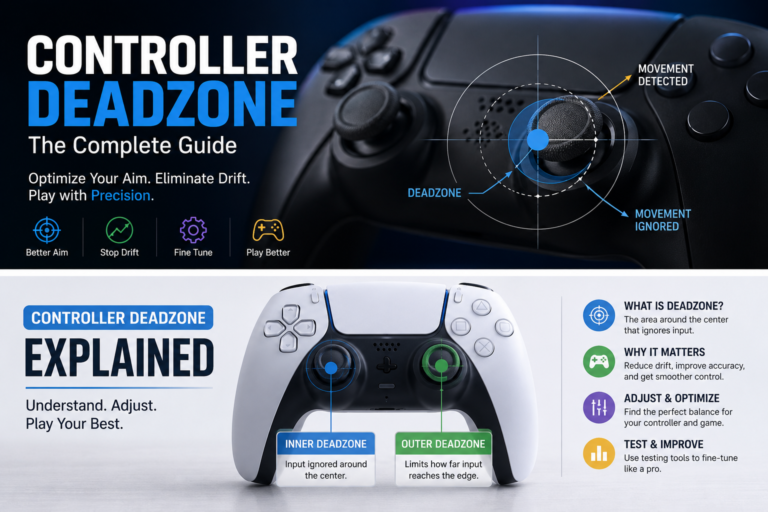
- Deadzones
- Vibration settings
- Profile switching
This flexibility is useful if you play different game genres.
For example:
- A shooter profile can prioritize faster trigger response.
- A racing profile can use smoother analog stick movement.
- A sports profile can map frequently used actions to the rear paddles.
Instead of constantly changing settings, you can switch profiles in seconds.
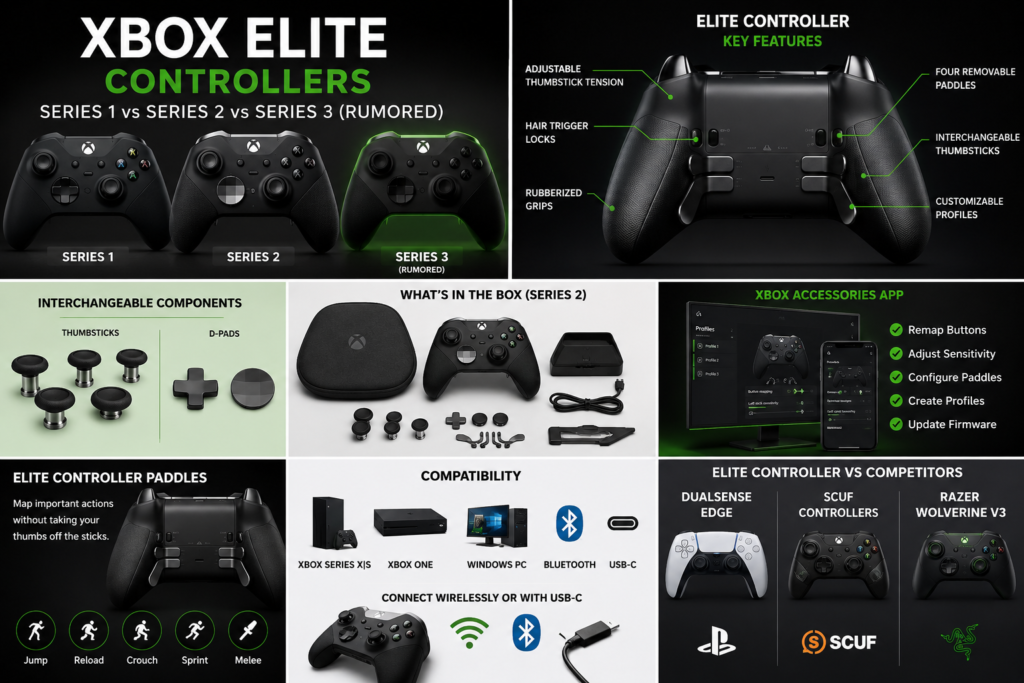
Xbox Elite Controller Software
The Xbox Accessories app is Microsoft’s official configuration software for the Elite controller. It is available on Xbox consoles and Windows PCs and provides access to advanced controller settings not available on a standard controller.
Some of the most useful features include:
- Firmware updates
- Custom button mapping
- Thumbstick calibration
- Trigger adjustments
- Profile management
- Shift button functionality
- Analog stick sensitivity tuning
If you’re using the controller on a Windows PC, installing this app should be one of your first steps.
Xbox Elite Controllers Accessories
The standard Xbox Elite Wireless Controller Series 2 package includes several premium accessories designed to support different gaming styles.
Inside the box, you’ll typically find:
- Xbox Elite Wireless Controller Series 2
- Carrying case
- Charging dock
- USB-C cable
- Thumbstick adjustment tool
- Four rear paddles
- Multiple interchangeable thumbsticks
- Additional D-pad
If you purchase the Elite Series 2 Core, the included accessories are more limited, although the controller remains compatible with the complete accessory pack sold separately.
Xbox Elite Controller Paddles
The rear paddles are one of the controller’s most valuable features.
Instead of moving your thumb away from the right analog stick, you can assign important actions to the back of the controller.
Many competitive players map functions such as:
For setup, compatibility, or buying details, read our controller compatibility guide.
- Jump
- Reload
- Crouch
- Weapon swap
- Sprint
- Melee attack
This allows faster reactions while maintaining control of the camera, especially in fast-paced multiplayer games.
The paddles attach magnetically, making them easy to remove or reposition depending on your preferred grip.
Battery Life & Charging
Battery life is another area where the Series 2 continues to impress.
Microsoft rates the built-in rechargeable battery for up to 40 hours of gameplay on a single charge, although actual runtime depends on usage, vibration settings, and connection method.
Charging is simple.
You can:
- Connect a USB-C cable directly.
- Place the controller on the included charging dock.
- Charge it while it’s inside the carrying case.
Compared with many premium controllers that require frequent charging, the Elite Series 2 remains one of the strongest performers for long gaming sessions.
Real Gaming Performance
During gameplay, the improvements become easier to appreciate than they do on a specification sheet.
The adjustable thumbstick tension gives players more control over aiming precision, while the shorter trigger locks reduce trigger travel for quicker inputs in supported games. These features are especially noticeable in competitive shooters, racing games, and titles that demand fast reaction times.
The controller also works seamlessly across:
- Xbox Series X
- Xbox Series S
- Xbox One
- Windows 10
- Windows 11
Connection options include Xbox Wireless, Bluetooth, and USB-C, giving players flexibility depending on their setup.
Known Issues
No controller is perfect, and the Elite Series 2 has developed a reputation for a few recurring problems reported by some owners over the years.
The most common issues include:
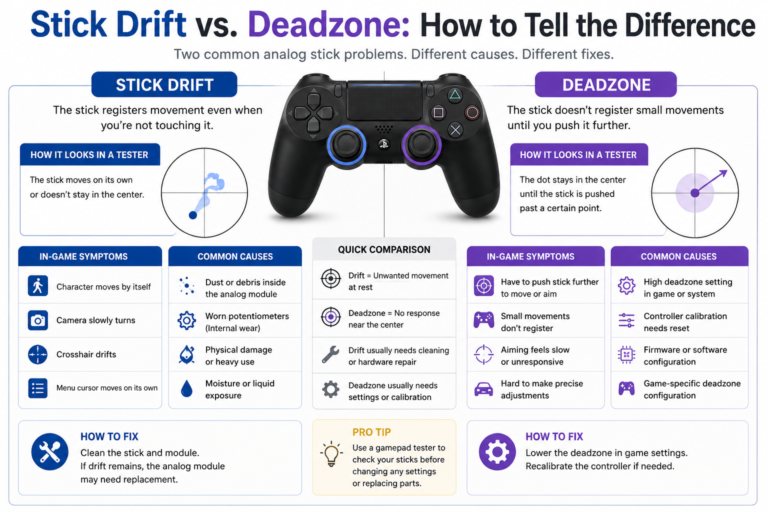
- Analog stick drift
- Sticky bumper buttons
- Trigger response problems
- Grip wear after long-term use
- Bluetooth connection issues
- Battery aging after years of heavy use
It’s important not to assume every problem is caused by hardware failure.
Before replacing your controller, test:
- Analog stick movement
- Trigger response
- Button inputs
- Rear paddles
- Deadzones
A browser-based Gamepad Tester can quickly show whether every input is registering correctly. In many cases, what feels like stick drift may actually be an aggressive deadzone setting, outdated firmware, or a calibration issue rather than a worn analog stick.
Xbox Elite Controller Price
The Xbox Elite Controller Series 2 remains one of Microsoft’s premium gaming accessories, so it costs more than a standard Xbox controller.
However, prices often change throughout the year because of seasonal promotions and retailer discounts. If you’re shopping during major sales events, you can frequently find better deals than the official retail price. The Elite Series 2 Core is also a lower-cost option for players who already own Elite accessories or don’t need the full accessory kit.
Pros & Cons
| Pros | Cons |
| Premium build quality | Higher price than a standard Xbox controller |
| Adjustable-tension thumbsticks | Some users report stick drift over time |
| Four removable rear paddles | Heavier than a standard controller |
| Excellent Xbox and Windows compatibility | The built-in battery cannot be swapped easily |
| Up to 40 hours of battery life | Premium features may be unnecessary for casual players |
| Deep customization through the Xbox Accessories app | Elite Series 2 Core includes fewer accessories |
| Comfortable rubberized grips | Learning curve for paddle mapping |
Our Verdict on the Xbox Elite Controller Series 2
Even in 2026, the Xbox Elite Controller Series 2 remains one of the best premium controllers for Xbox and Windows PC users. Its combination of long battery life, extensive customization, premium materials, and excellent software support continues to make it a strong choice for competitive and enthusiast gamers.
If Microsoft officially introduces the Series 3 with meaningful hardware improvements, that recommendation may change. Until then, the Series 2 continues to offer one of the most complete premium controller experiences available today.
Xbox Elite Controller Series 1: Is It Still Worth Buying in 2026?
The original Xbox Elite Controller Series 1 changed what players expected from a premium controller. Released in 2015, it introduced features that were uncommon at the time, including interchangeable thumbsticks, rear paddles, trigger locks, and premium materials. It quickly became a favorite among competitive players and helped establish Microsoft’s Elite controller lineup.
For setup, compatibility, or buying details, read our PlayStation 3 controller setup.
Although newer models have improved on its design, the Series 1 still appears on second-hand marketplaces, leaving many buyers wondering whether it’s a smart purchase in 2026.
What Made the Series 1 Special?
When Microsoft launched the first Elite controller, most standard controllers offered little or no customization. The Series 1 gave players much greater control over how their controller felt and responded.
Its standout features included:
- Interchangeable thumbsticks
- Removable rear paddles
- Hair trigger locks
- Stainless steel D-pad
- Rubberized grip
- Button remapping through the Xbox Accessories app
- Premium carrying case
These features made it popular with players who wanted faster inputs and more personalized controls.
What Still Holds Up Today?
Despite its age, several features still feel modern.
The rear paddles remain useful for competitive games where keeping your thumbs on the analog sticks improves reaction time. The interchangeable thumbsticks also let players choose different heights depending on the game they’re playing.
Build quality is another strength. Many well-maintained Series 1 controllers are still working years after release, showing that Microsoft designed the controller with durability in mind.
If you mainly play on Xbox One or Windows PC and find a controller in excellent condition, it can still provide a premium gaming experience.
Limitations Compared With Series 2
While the original Elite controller introduced many premium features, the Series 2 improved almost every area.
Some of the biggest differences include:
| Xbox Elite Series 1 | Xbox Elite Series 2 |
| Uses AA batteries | Built-in rechargeable battery |
| Micro-USB charging | USB-C charging |
| Fixed thumbstick tension | Adjustable thumbstick tension |
| Older Bluetooth support | Improved wireless connectivity |
| Fewer onboard profiles | Three custom profiles plus default |
| Shorter battery life | Up to 40 hours of battery life |
The built-in rechargeable battery alone makes the Series 2 much more convenient for players who game regularly.
Should You Buy a Used Xbox Elite Series 1?
Buying a used controller always carries some risk.
Before purchasing one, carefully inspect:
- Analog stick movement
- Trigger response
- Rear paddles
- Grip condition
- USB port
- Battery compartment
- Thumbstick wear
If possible, test the controller using a browser-based Gamepad Tester before completing the purchase. A quick input test can reveal stick drift, unresponsive buttons, or trigger problems that aren’t immediately visible.
If the price difference between a used Series 1 and a discounted Series 2 is small, the newer controller is usually the better long-term investment.
Xbox Elite Controller Series 3: Everything We Know So Far
The Xbox Elite Controller Series 3 has become one of the most anticipated gaming accessories, even though Microsoft has not officially announced it.
Rumors have circulated for several years, but recent regulatory filings and industry reports suggest Microsoft may be preparing the next generation of its premium controller. While no official specifications have been confirmed, enough information has surfaced to give players an idea of what could be coming.
It’s important to separate confirmed information from speculation, especially when evaluating rumors.
The Anatel Certification Leak (May 2026)
One of the strongest signs that a new Xbox controller may be in development came from documents published by Anatel, Brazil’s telecommunications regulator.
Regulatory certifications often appear before new wireless devices are officially released because manufacturers must obtain approval before selling products in certain markets.
The filing itself does not confirm the product name or final features, but it has fueled speculation that Microsoft is preparing a successor to the Elite Series 2.
As with all certification documents, buyers should avoid treating them as official product announcements.
Rumored Features
Although Microsoft has not confirmed any specifications, reports from industry observers have suggested several possible improvements.
Common rumors include:
- Hall Effect analog sticks
- Longer battery life
- Improved wireless performance
- Lower input latency
- Redesigned rear paddles
- Enhanced trigger adjustment
- Better durability
- Updated charging dock
- New customization options
- Refined Xbox Accessories app integration
Among these, Hall Effect thumbsticks receive the most attention because they could reduce the likelihood of traditional stick drift by using magnetic sensors instead of physical contact.
Until Microsoft officially reveals the controller, these features should be viewed as speculation rather than confirmed specifications.
For setup, compatibility, or buying details, read our limited-edition PS5 controller.
Did the Xbox Games Showcase 2026 Include Series 3?
Many players expected Microsoft to reveal a new Elite controller during the Xbox Games Showcase 2026.
That announcement did not happen.
Instead, the showcase focused primarily on upcoming games, platform updates, and hardware-related news outside the Elite controller lineup.
As of now, Microsoft has not officially introduced the Xbox Elite Controller Series 3.
Expected Release Window
Because Microsoft has not announced the controller, there is no confirmed release date.
Industry analysts generally expect that if a new Elite controller is in development, Microsoft will reveal it only when both the hardware and supporting software are ready.
Until an official announcement is made, any release window should be treated as an estimate rather than a confirmed schedule.
Expected Price
Pricing also remains unknown.
Given the premium positioning of previous Elite controllers, many observers expect the next model to launch within a similar price range as the Elite Series 2 at release.
Final pricing will likely depend on:
- New hardware features
- Included accessories
- Regional pricing
- Exchange rates
- Market competition
Microsoft has not published official pricing information.
Should You Wait for Series 3 or Buy Series 2?
For most buyers, the answer depends on how soon they need a controller.
Consider buying the Series 2 today if:
- Your current controller no longer works.
- You play regularly on Xbox or Windows PC.
- You want proven software support.
- You need rear paddles and adjustable thumbsticks now.
- You find a good sale price.
Waiting may make sense if:
- Your current controller still performs well.
- You’re interested in potential Hall Effect sticks.
- You’re willing to wait for official information.
- You prefer buying the newest hardware.
For players who need a premium controller today, the Xbox Elite Controller Series 2 remains the safest recommendation because it offers mature software, broad compatibility, and a feature set that continues to compete well in 2026. If Microsoft officially announces the Series 3 with meaningful improvements, you can always compare both models before making your next upgrade.
Xbox Elite Controller Comparison: Series 1 vs Series 2 vs Series 3
Choosing the right Xbox Elite Controller depends on your budget, the features you need, and whether you’re willing to wait for Microsoft’s next premium controller.
For most buyers in 2026, the Xbox Elite Controller Series 2 offers the best balance of performance, customization, software support, and long-term value. The original Series 1 is mainly for budget-conscious buyers looking at the used market, while the Series 3 remains an unreleased product with features based on leaks rather than official specifications.
| Feature | Series 1 | Series 2 | Series 3 (Rumored) |
| Release Year | 2015 | 2019 | Not officially released |
| Rechargeable Battery | No | Yes | Expected |
| USB-C | No | Yes | Expected |
| Adjustable-Tension Thumbsticks | No | Yes | Expected |
| Rear Paddles | Yes | Yes | Expected |
| Hair Trigger Locks | Yes | Yes | Expected |
| Bluetooth | Limited | Yes | Expected |
| Xbox Accessories App | Yes | Improved support | Expected |
| Build Quality | Premium | Improved Premium | Unknown |
| Best For | Budget buyers | Most gamers | Early adopters |
Which Version Offers the Best Value?
If you’re buying your first premium Xbox controller, the Series 2 remains the strongest recommendation.
For setup, compatibility, or buying details, read our choosing an arcade stick.
It offers:
- Excellent software support
- Long battery life
- Adjustable thumbsticks
- Comfortable grips
- Four rear paddles
- Strong Windows compatibility
Unless Microsoft officially announces the Series 3 with meaningful hardware improvements, there is little reason to delay your purchase if you need a controller today.
Xbox Elite Controller vs DualSense Edge
The DualSense Edge is Sony’s premium controller for PlayStation, while the Xbox Elite Series 2 is designed for Xbox consoles and Windows PCs.
Both controllers include:
- Replaceable thumbsticks
- Rear buttons
- Trigger adjustments
- Multiple custom profiles
- Premium materials
However, each controller excels in different areas.
| Xbox Elite Series 2 | DualSense Edge |
| Better Windows integration | Better PlayStation integration |
| Longer battery life | Shorter battery life |
| Xbox Accessories App | PlayStation customization |
| Adjustable thumbstick tension | Replaceable stick modules |
| Better PC compatibility | Better adaptive trigger support |
If you mainly play on Windows or Xbox, the Elite Series 2 offers a smoother overall experience. If you’re primarily a PlayStation player, the DualSense Edge makes more sense because of its exclusive features and system integration.
Xbox Elite Controller vs SCUF Controllers
SCUF controllers are popular among competitive gamers because they focus on fast inputs and customization.
Compared with the Elite Series 2:
Choose SCUF if you want:
- Tournament-focused controls
- Extensive cosmetic customization
- Competitive FPS layouts
Choose Xbox Elite Series 2 if you want:
- Official Microsoft support
- Better software integration
- Excellent Windows compatibility
- A complete accessory package
For most players, Microsoft’s software ecosystem remains one of the biggest advantages of the Elite controller.
Xbox Elite Controller vs Razer Wolverine
The Razer Wolverine series has become one of the Elite controllers’ strongest competitors.
Some newer Wolverine models include:
- Hall Effect or TMR stick technology (depending on the model)
- Mechanical face buttons
- Ultra-low latency wireless
- Additional remappable buttons
- Razer software customization
The Elite Series 2 still has strengths of its own:
- Adjustable thumbstick tension
- Better first-party Xbox integration
- Familiar Xbox ergonomics
- Strong battery life
- Seamless Xbox Accessories app support
If avoiding stick drift is your highest priority, newer Hall Effect or TMR-equipped competitors deserve consideration.
Xbox Elite Controller vs Steam Controller
The latest Steam Controller is designed primarily for PC gamers.
Unlike the Elite controller, it focuses on:
- Steam Input customization
- Dual touchpads
- Trackpad navigation
- Extensive PC controls
Meanwhile, the Elite Series 2 focuses on:
- Xbox consoles
- Windows gaming
- Traditional controller layout
- Competitive multiplayer gaming
If most of your library is on Steam and you enjoy experimenting with advanced input customization, the Steam Controller is worth exploring. If you regularly switch between Xbox and Windows, the Elite Series 2 provides a more familiar experience.
Which Premium Controller Should You Buy?
Your best choice depends on how and where you play.
| Your Situation | Recommended Controller |
| Best all-around Xbox controller | Xbox Elite Controller Series 2 |
| Best for PlayStation | DualSense Edge |
| Best for competitive FPS on Xbox | Razer Wolverine |
| Best for Steam enthusiasts | Steam Controller |
| Best for deep PC input customization | Steam Controller |
| Best official Microsoft controller | Xbox Elite Controller Series 2 |
No single controller is perfect for every player. The right choice depends on your preferred platform, favorite games, and the features you value most.
Xbox Elite Controller Price Guide
The Xbox Elite Controller costs more than a standard Xbox controller because it includes premium materials, interchangeable accessories, rear paddles, advanced software customization, and a rechargeable battery.
In general:
- Series 1 is available only through used or refurbished sellers.
- Series 2 is widely available and frequently discounted during major sales.
- Series 2 Core offers a lower entry price with fewer included accessories.
- Series 3 pricing remains unknown because Microsoft has not officially announced the controller.
If you’re shopping during seasonal promotions, comparing prices across trusted retailers can often save a significant amount.
Buying Guide: Which Xbox Elite Controller Is Right for You?
Buy the Series 2 if:
- You need a premium controller today.
- You play on Xbox and Windows.
- You want proven software support.
- You value long battery life.
- You want adjustable thumbsticks and rear paddles.
Consider a Used Series 1 if:
- You’re on a tight budget.
- You find one in excellent condition.
- You can test it before purchasing.
Wait for the Series 3 if:
- Your current controller still works well.
- You’re interested in possible hardware upgrades.
- You’re comfortable waiting for Microsoft’s official announcement.
- You prefer buying the newest generation after independent reviews become available.
For most players in 2026, the Xbox Elite Controller Series 2 remains the most complete and practical choice. It combines mature software, premium hardware, and excellent compatibility, making it a dependable option while the future of the Series 3 remains uncertain.
Xbox Elite Controller Comparison: Series 1 vs Series 2 vs Series 3
Choosing the right Xbox Elite Controller depends on your budget, the features you need, and whether you’re willing to wait for Microsoft’s next premium controller.
For most buyers in 2026, the Xbox Elite Controller Series 2 offers the best balance of performance, customization, software support, and long-term value. The original Series 1 is mainly for budget-conscious buyers looking at the used market, while the Series 3 remains an unreleased product with features based on leaks rather than official specifications.
| Feature | Series 1 | Series 2 | Series 3 (Rumored) |
| Release Year | 2015 | 2019 | Not officially released |
| Rechargeable Battery | No | Yes | Expected |
| USB-C | No | Yes | Expected |
| Adjustable-Tension Thumbsticks | No | Yes | Expected |
| Rear Paddles | Yes | Yes | Expected |
| Hair Trigger Locks | Yes | Yes | Expected |
| Bluetooth | Limited | Yes | Expected |
| Xbox Accessories App | Yes | Improved support | Expected |
| Build Quality | Premium | Improved Premium | Unknown |
| Best For | Budget buyers | Most gamers | Early adopters |
Which Version Offers the Best Value?
If you’re buying your first premium Xbox controller, the Series 2 remains the strongest recommendation.
For setup, compatibility, or buying details, read our PS5 controller Black Friday guide.
It offers:
- Excellent software support
- Long battery life
- Adjustable thumbsticks
- Comfortable grips
- Four rear paddles
- Strong Windows compatibility
Unless Microsoft officially announces the Series 3 with meaningful hardware improvements, there is little reason to delay your purchase if you need a controller today.
Xbox Elite Controller vs DualSense Edge
The DualSense Edge is Sony’s premium controller for PlayStation, while the Xbox Elite Series 2 is designed for Xbox consoles and Windows PCs.
Both controllers include:
- Replaceable thumbsticks
- Rear buttons
- Trigger adjustments
- Multiple custom profiles
- Premium materials
However, each controller excels in different areas.
| Xbox Elite Series 2 | DualSense Edge |
| Better Windows integration | Better PlayStation integration |
| Longer battery life | Shorter battery life |
| Xbox Accessories App | PlayStation customization |
| Adjustable thumbstick tension | Replaceable stick modules |
| Better PC compatibility | Better adaptive trigger support |
If you mainly play on Windows or Xbox, the Elite Series 2 offers a smoother overall experience. If you’re primarily a PlayStation player, the DualSense Edge makes more sense because of its exclusive features and system integration.
Xbox Elite Controller vs SCUF Controllers
SCUF controllers are popular among competitive gamers because they focus on fast inputs and customization.
Compared with the Elite Series 2:
Choose SCUF if you want:
- Tournament-focused controls
- Extensive cosmetic customization
- Competitive FPS layouts
Choose Xbox Elite Series 2 if you want:
- Official Microsoft support
- Better software integration
- Excellent Windows compatibility
- A complete accessory package
For most players, Microsoft’s software ecosystem remains one of the biggest advantages of the Elite controller.
Xbox Elite Controller vs Razer Wolverine
The Razer Wolverine series has become one of the Elite controllers’ strongest competitors.
Some newer Wolverine models include:
- Hall Effect or TMR stick technology (depending on the model)
- Mechanical face buttons
- Ultra-low latency wireless
- Additional remappable buttons
- Razer software customization
The Elite Series 2 still has strengths of its own:
- Adjustable thumbstick tension
- Better first-party Xbox integration
- Familiar Xbox ergonomics
- Strong battery life
- Seamless Xbox Accessories app support
If avoiding stick drift is your highest priority, newer Hall Effect or TMR-equipped competitors deserve consideration.
Xbox Elite Controller vs Steam Controller
The latest Steam Controller is designed primarily for PC gamers.
Unlike the Elite controller, it focuses on:
- Steam Input customization
- Dual touchpads
- Trackpad navigation
- Extensive PC controls
Meanwhile, the Elite Series 2 focuses on:
- Xbox consoles
- Windows gaming
- Traditional controller layout
- Competitive multiplayer gaming
If most of your library is on Steam and you enjoy experimenting with advanced input customization, the Steam Controller is worth exploring. If you regularly switch between Xbox and Windows, the Elite Series 2 provides a more familiar experience.
Which Premium Controller Should You Buy?
Your best choice depends on how and where you play.
| Your Situation | Recommended Controller |
| Best all-around Xbox controller | Xbox Elite Controller Series 2 |
| Best for PlayStation | DualSense Edge |
| Best for competitive FPS on Xbox | Razer Wolverine |
| Best for Steam enthusiasts | Steam Controller |
| Best for deep PC input customization | Steam Controller |
| Best official Microsoft controller | Xbox Elite Controller Series 2 |
No single controller is perfect for every player. The right choice depends on your preferred platform, favorite games, and the features you value most.
Xbox Elite Controller Price Guide
The Xbox Elite Controller costs more than a standard Xbox controller because it includes premium materials, interchangeable accessories, rear paddles, advanced software customization, and a rechargeable battery.
In general:
- Series 1 is available only through used or refurbished sellers.
- Series 2 is widely available and frequently discounted during major sales.
- Series 2 Core offers a lower entry price with fewer included accessories.
- Series 3 pricing remains unknown because Microsoft has not officially announced the controller.
If you’re shopping during seasonal promotions, comparing prices across trusted retailers can often save a significant amount.
Buying Guide: Which Xbox Elite Controller Is Right for You?
Buy the Series 2 if:
- You need a premium controller today.
- You play on Xbox and Windows.
- You want proven software support.
- You value long battery life.
- You want adjustable thumbsticks and rear paddles.
Consider a Used Series 1 if:
- You’re on a tight budget.
- You find one in excellent condition.
- You can test it before purchasing.
Wait for the Series 3 if:
- Your current controller still works well.
- You’re interested in possible hardware upgrades.
- You’re comfortable waiting for Microsoft’s official announcement.
- You prefer buying the newest generation after independent reviews become available.
For most players in 2026, the Xbox Elite Controller Series 2 remains the most complete and practical choice. It combines mature software, premium hardware, and excellent compatibility, making it a dependable option while the future of the Series 3 remains uncertain.


One Comment