
PS5 Controller Flashing Blue? Why It Happens and How to Fix It
“”
Last updated: August 16, 2026
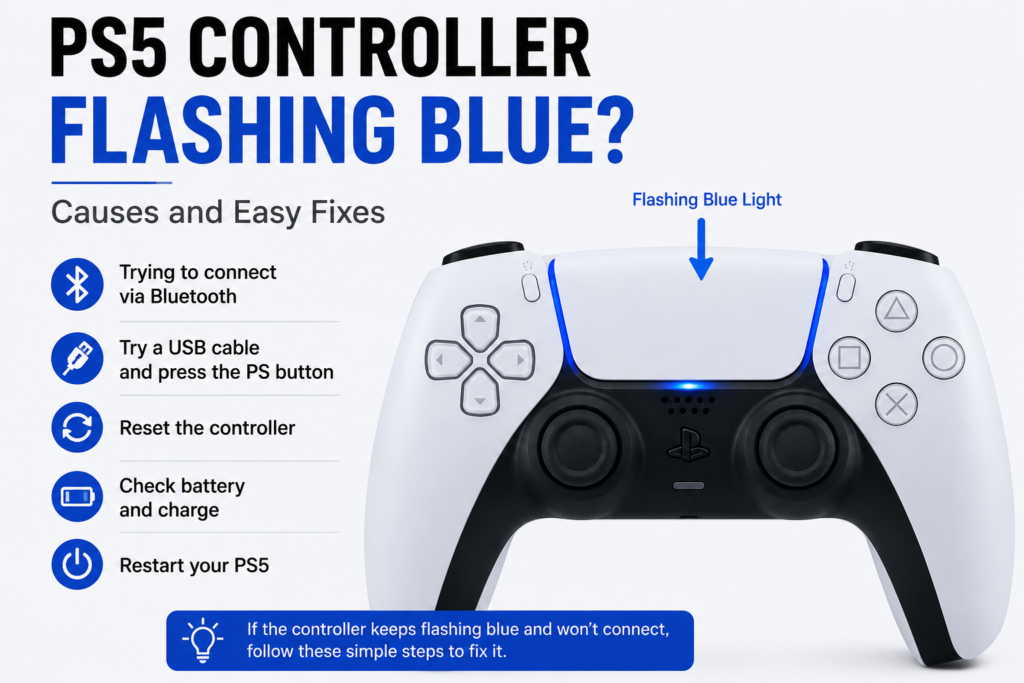
If your PS5 controller tester keeps flashing blue and never connects, the DualSense is usually trying to establish a connection but pairing is not completing. Start by connecting it directly to the PS5 with a USB cable and pressing the PS button. If USB works but wireless does not, focus on Bluetooth pairing. If it flashes blue once and turns off, check the battery and power too.
The useful question is not simply, “Why is the light blue?”
It is:
Does the controller actually finish connecting?
Sony says the DualSense light bar blinks during pairing. When the connection succeeds, the player indicator lights up.
What Does a Flashing Blue Light on a PS5 Controller Mean?
A flashing light is not automatically a fault.
The DualSense normally blinks while it is trying to pair or connect. For example, when Bluetooth pairing mode is started, the light bar flashes while the controller looks for a supported device.
The problem begins when the controller keeps flashing but never reaches a working connection.
Use the behavior to narrow down the cause.
| What the controller does | What to check first |
|---|---|
| Flashes after you intentionally enter pairing mode | Pairing may be working normally |
| Keeps flashing and never connects | Pairing or connection problem |
| Works with USB but not wirelessly | Bluetooth or wireless pairing |
| Flashes blue once and turns off | Battery, power, or connection |
| Two controllers suddenly start flashing | Check the PS5 first Controller test |
| Started after using the controller on PC or phone | Reconnect or switch the pairing |
| Keeps flashing even while plugged in | Cable, USB port, or pairing |
| Connects after restarting the PS5 | Console connection state was likely involved |
When Is Blue Flashing Normal?
Blue flashing can be normal while the controller is entering pairing mode.
For Bluetooth pairing with a supported PC, Mac, phone, or other device, Sony instructs users to hold the Create button and PS button Tester until the light bar begins blinking.
When pairing completes, the player indicator lights.
So if you intentionally started Bluetooth pairing and the controller flashes for a short time before connecting, there may be nothing to fix.
When Does the Blue Flashing Mean There Is a Problem?
Treat it as a troubleshooting issue when:
- the controller keeps blinking and never connects
- pressing the PS button does not connect it to the PS5
- the player indicator never appears
- it flashes and shuts down
- it will not connect through USB either
- it disconnects again immediately after pairing
Start with the connection before assuming the controller hardware is broken.
Why Is My PS5 Controller Flashing Blue?
The most likely causes are related to connection or power.
The DualSense may be:
- trying to pair with the PS5
- trying to connect to a PC, phone, or another registered device
- failing to complete Bluetooth pairing
- using a bad or unsuitable USB cable
- connected to a problematic PS5 USB port
- stuck in a temporary console connection state
- in need of a controller reset
- running outdated controller or PS5 software
- too low on usable battery power to stay connected
- experiencing a hardware problem if all connection methods fail
Work through these in order.
PS5 Controller Flashing Blue but Not Connecting
If the controller keeps blinking but the PS5 does not recognize it, start with USB.
1. Connect the DualSense Directly to the PS5
Turn on the PS5.
Connect the controller directly to the console with a compatible USB cable.
Press the PS button.
Sony’s normal pairing process uses this exact approach. After the light bar blinks, the player indicator should light when pairing completes.
Now look at the result.
If it connects: the controller can communicate with the console. Focus on wireless pairing if the problem returns after unplugging it.
If it keeps flashing: move to the cable and USB-port checks.
2. Try Another USB Cable
A cable can charge a device and still be unsuitable for the connection you are trying to establish.
Use a known-good USB cable that supports both power and data.
Connect it directly between the controller and PS5.
Press the PS button again.
If the second cable works, replace the first cable.
If nothing changes, keep the known-good cable attached and try another console port.
3. Try Another PS5 USB Port
Move the cable to another compatible USB port on the PS5 vibration tester.
Then press the PS button.
If the controller connects through one port but not another, the controller itself may be fine.
The original console USB port or connection path becomes the better place to investigate.
4. Restart the PS5
A console-side connection problem can sometimes make a working controller appear broken.
Restart the PS5.
After it starts again, connect the DualSense with USB and press the PS button.
This is especially important if more than one previously working controller suddenly starts blinking and refusing to connect.
If two controllers fail at the same time, it is less likely that both controllers developed the exact same hardware fault together.
5. Pair the Controller Again
With the PS5 turned on, connect the controller with USB and press PS.
Wait for the player indicator.
If it appears and the controller works, unplug the cable and test wireless control.
If it immediately goes back to flashing and stops responding, focus on Bluetooth or wireless pairing.
6. Reset the DualSense
If reconnecting does not work, reset the controller.
Sony’s current reset procedure is:
- Turn off the PS5.
- Disconnect the DualSense from the USB cable.
- Find the small reset hole beside the Sony logo on the back.
- Use a pin or similar tool to hold the reset button for at least five seconds.
- Connect the controller back to the PS5 with the official USB cable.
- Press the PS button.
Sony recommends this process when troubleshooting DualSense problems.
After the reset, check whether the controller connects.
Do not repeat the reset again and again if nothing changes. Move on to the next diagnosis.
7. Update the PS5 and DualSense Software
If you can control the PS5 with another controller, make sure the console system software is current.
You can manually check the DualSense software under:
Settings > Accessories > Controller (General) > DualSense Wireless Controller Device Software
Sony also provides PlayStation Accessories for updating DualSense software from a supported Windows PC.
Update, reconnect the controller, and test again.
How Do I Know If the Fix Worked?
Do not stop at “the light changed.”
Check three things:
Does the flashing stop?
Does the player indicator light?
Can you unplug USB and continue using the controller wirelessly?
If all three happen, the controller is connecting normally again.
PS5 Controller Flashes Blue Then Turns Off
This is different from a controller that keeps flashing continuously.
If the DualSense flashes blue briefly and then shuts down, check power as well as pairing.
Charge the Controller First
Connect it to a reliable charging source using a known-good cable.
Give the battery time to charge.
Then reconnect it to the PS5 and press PS.
If it now stays powered and connects, low battery power was likely part of the problem.
Try Another Cable
If it still flashes and shuts down, swap the USB cable.
A poor connection can prevent the controller from charging or communicating correctly.
Reset and Reconnect
Perform the Sony reset procedure, reconnect through USB, and press PS.
Watch whether the controller stays on.
Check Whether It Works Only While Plugged In
If the controller works normally with USB attached but turns off soon after the cable is removed, investigate the battery or internal power system.
That behavior is different from a pure Bluetooth-pairing problem.
When Does Flashing Then Turning Off Point to Hardware?
Hardware becomes more likely if:
- multiple known-good cables fail
- the controller has been charged but still shuts off
- it fails on several USB ports
- it cannot stay powered even when pairing
- reset does nothing
- there was drop or liquid damage
Do not open the controller before ruling out the easy connection and power checks.
PS5 Controller Flashing Blue Even When Plugged In
Being plugged in does not automatically mean pairing has completed.
First try another data-capable USB cable.
Then try another PS5 USB port.
Press the PS button after each change.
Use the result to narrow down the problem:
Another cable works: original cable was likely the issue.
Another PS5 port works: investigate the original console port.
USB works but wireless does not: focus on Bluetooth or pairing.
Nothing works through USB: move toward reset, console, power, or controller hardware diagnosis.
Was Your DualSense Recently Connected to a PC, Phone, or Another Device?
This matters more now because current DualSense software supports registering multiple pairings.
Sony says a DualSense can store up to four different pairings, each assigned to a slot.
If the controller was recently used with:
- Windows PC
- Mac
- Android phone
- iPhone or iPad
- another compatible device
- another PS5
make sure you are reconnecting to the device you actually want.
The easiest way to return to the PS5 is to connect the controller to the console with a compatible USB cable and press the PS button. Sony specifically recommends this for reconnecting after using the controller with another device.
Why Is My PS5 Controller Flashing Blue on PC?
Flashing on PC is not automatically an error.
If you intentionally entered Bluetooth pairing mode, the light bar is expected to blink while the computer searches for the controller.
Sony’s Bluetooth pairing process is:
- Make sure the player indicator is off.
- Disconnect USB.
- Hold the Create button.
- Hold the PS button until the light bar blinks.
- Turn on Bluetooth on the PC.
- Select the controller from the available Bluetooth devices.
Once pairing completes, the player indicator lights.
What If Windows Never Finds the Controller?
Check that Bluetooth is enabled.
Remove an old DualSense Bluetooth entry if Windows already has one that no longer works.
Put the controller back into pairing mode.
Try pairing again.
If Bluetooth still fails, connect through USB.
What If It Works on PC With USB but Not Bluetooth?
That points more toward the computer’s Bluetooth path than a completely dead controller.
Check:
- Bluetooth adapter
- Bluetooth drivers
- existing pairing
- interference
- Windows device list
Do not replace the DualSense just because one connection method fails.
PS5 Controller Flashes Blue Then Turns Off on PC
First test whether the same thing happens on the PS5.
Only happens on PC: focus on Bluetooth pairing and the computer.
Happens on PS5 too: check battery, controller power, reset, and hardware.
Works over USB but shuts down during Bluetooth pairing: wireless connection becomes the stronger suspect.
Will not stay powered anywhere: battery or internal power deserves closer attention.
Both PS5 Controllers Are Flashing Blue and Won’t Connect
If two controllers that worked normally before suddenly start blinking and refusing to connect, troubleshoot the console first.
Try:
- Restart the PS5.
- Connect only one controller through USB.
- Press the PS button.
- Try another PS5 USB port.
- Make sure system software is current.
- Test the second controller after the first one connects.
Two controllers failing at exactly the same time makes a console-side connection problem more plausible than two simultaneous controller failures.
What Does It Mean When a PS5 Controller Flashes Blue and White?
Do not treat blue and white as a universal DualSense hardware error code.
Sony’s support documentation describes blinking during pairing and player-indicator behavior after connection, but it does not publish a simple consumer chart where every blue-and-white sequence maps to one specific hardware fault.
Ask the more useful question:
Does the controller eventually connect?
If it does, temporary changes in the controller lights may be part of pairing, player indication, or software behavior.
If the controller keeps cycling lights and never connects, troubleshoot the connection.
Why Is My PS5 Controller Flashing Blue Then Orange?
Blue flashing can happen during a connection attempt.
Orange pulsing is associated with charging behavior, especially while the PS5 is in Rest Mode.
Seeing blue followed by orange does not by itself identify a specific hardware fault.
Check:
- whether the controller connected
- whether the battery is charging
- whether it stays on after charging
- whether USB pairing works
Use controller behavior instead of guessing from color alone.
Why Does My PS5 Controller Flash Blue Six Times?
Do not assume six flashes are an official Sony error code.
PlayStation’s current controller support documentation does not list “six blue flashes” as a universal DualSense fault code.
If the controller flashes several times and then fails to connect, treat it as a failed connection attempt first.
Try:
USB pairing → another cable → another PS5 port → restart → reset → software update
If the controller also turns off, include battery and power checks.
Why Is My PS5 Controller Flashing Blue and Red?
Controller lighting can also change according to games and software.
If blue and red lighting appears only while playing a particular game and the controller works normally, it may be game-controlled behavior.
If the controller is not connecting at all, do not spend too much time decoding the colors.
Test the actual connection:
Does USB work?
Does Bluetooth work?
Does the player indicator appear?
Those answers are more useful than the color combination.
Does a Low Battery Make a PS5 Controller Flash Blue?
Blue flashing is mainly associated with connection and pairing behavior.
But a controller with very little usable battery power may fail to stay on long enough to finish connecting.
Battery or power becomes more important if the controller:
- flashes once and turns off
- works only while plugged in
- turns off moments after connecting
- will not stay powered after charging attempts
Charge it before diagnosing deeper pairing problems.
How Do I Know If the Controller or PS5 Is the Problem?
Use comparison testing.
| Test | Result | What becomes more likely |
|---|---|---|
| Another DualSense works normally | Original controller problem | |
| Two controllers fail together | PS5 or console-side issue | |
| USB works but Bluetooth fails | Wireless/pairing issue | |
| Different cable fixes it | Cable | |
| Different PS5 USB port fixes it | Console USB port | |
| Controller works on PC but not PS5 | PS5 pairing or console issue | |
| Controller fails on PS5, PC, USB and Bluetooth | Controller power/hardware |
This prevents you from replacing a controller before knowing which side is failing.
When Is Flashing Blue Probably a Hardware Problem?
Start thinking about hardware only after normal connection fixes fail.
Hardware becomes more plausible when:
- several known-good USB cables fail
- several PS5 USB ports fail
- another controller works normally on the same console
- the affected controller will not work on PC either
- reset makes no difference
- the controller cannot stay powered
- the USB-C port is physically damaged
- liquid or impact damage occurred
- the controller never completes pairing on any supported device
At that point, repair may make more sense than repeating software fixes.
Will Sony Repair a PS5 Controller That Keeps Flashing Blue?
Sony provides a PlayStation Repairs path for controller pairing and hardware problems.
Its current controller support pages direct users to PlayStation Repairs when resetting the DualSense does not solve the connection issue.
If the controller may still be covered by warranty, check PlayStation support before opening it.
Do not assume every repair will be free. Coverage depends on the fault, warranty status, purchase information, and Sony’s terms.
Should You Repair or Replace a PS5 Controller That Keeps Flashing?
Use the diagnosis first.
| Situation | Best next move |
|---|---|
| USB reconnect solves it | Keep using controller |
| Different cable solves it | Replace cable |
| Restart fixes both controllers | Console-side temporary issue |
| USB works but wireless fails | Troubleshoot Bluetooth |
| Controller flashes then dies | Check battery/power |
| USB-C port is physically damaged | Get repair quote |
| Controller fails on every device | Repair evaluation |
| Controller may still be covered | Check Sony support |
| Repair cost is close to replacement | Compare both options |
Do not buy another DualSense simply because the light flashed blue.
PS5 Controller Flashing Blue Quick Fix Checklist
Use this order:
- Check whether you intentionally entered pairing mode.
- Connect the DualSense directly to the PS5 with USB.
- Press the PS button.
- Look for the player indicator.
- Try another data-capable USB cable.
- Try another PS5 USB port.
- Restart the PS5.
- Reconnect the controller.
- Reset the DualSense.
- Update PS5 and controller software.
- Check whether it was recently paired to PC or phone.
- Charge it if it flashes and turns off.
- Test another controller on the same PS5.
- Consider hardware repair only if connection and power tests fail.
FAQS
Why is my PS5 controller flashing blue?
The DualSense light bar can flash while the controller is trying to pair or connect. If it keeps flashing and the player indicator never lights, the connection is not completing. Connect it to the PS5 with USB and press the PS button first.
Why is my PS5 controller flashing blue but not connecting?
The controller may be failing to pair because of a USB cable, console port, Bluetooth connection, previous device pairing, software state, or controller problem. Test USB pairing first because it quickly separates a wireless problem from a broader connection problem.
Why does my PS5 controller flash blue then turn off?
Check battery and power as well as pairing. Charge the controller, try another cable, reset it, and reconnect through USB. If it works only when plugged in, the battery or internal power system deserves closer attention.
What does flashing blue and white mean on a PS5 controller?
Sony does not publish a universal blue-and-white fault code for the DualSense. Check whether the controller actually completes pairing and whether the player indicator lights. If it connects normally, the color change alone may not indicate a fault.
Why is my PS5 controller flashing blue then orange?
Blue can appear during connection attempts, while orange pulsing is associated with charging behavior. Check whether the controller connects and whether the battery is charging instead of treating the color sequence as a specific error code.
Why does my PS5 controller flash blue six times?
Sony’s current controller support information does not define six blue flashes as a universal hardware error code. If it flashes several times without connecting, troubleshoot pairing, USB, reset, software, and power.
Why is my PS5 controller flashing blue and red?
Games and software can control light-bar colors. If blue and red appears while the controller works normally in a particular game, it may be game-related lighting. If the controller will not connect, troubleshoot the connection instead of the color.
Why is my PS5 controller flashing blue on PC?
Flashing is normal while the DualSense is in Bluetooth pairing mode. If Windows never completes pairing, check the PC’s Bluetooth, remove an old controller pairing if needed, and try USB to confirm that the controller itself works.
Why does my PS5 controller flash blue then turn off on PC?
If the problem happens only on PC, investigate PC Bluetooth and pairing. If it happens on the PS5 too, check the battery, controller power, USB connection, and reset.
Why does my DualSense keep flashing after I reset it?
A reset does not guarantee a successful connection. Reconnect the controller to the PS5 with USB and press the PS button. If it continues flashing, test another cable and USB port before moving to hardware diagnosis.
Why does my PS5 controller work over USB but not Bluetooth?
That usually points toward wireless pairing rather than a completely failed controller. Reconnect the DualSense, check previous device pairings, update software, and test Bluetooth again.
Can a low battery cause a PS5 controller to flash blue?
Blue flashing mainly relates to connection behavior, but very low usable battery power can prevent the controller from staying on long enough to connect. Charge it if it flashes briefly and turns off.
How do I reconnect a DualSense after using it on PC or phone?
Connect the DualSense directly to the PS5 with a compatible USB cable and press the PS button. Sony recommends this method for reconnecting the controller to the console after using it with another device.
Are blue flashes an official PS5 controller error code?
Not by themselves. Sony documents blinking during pairing, but its current DualSense support documentation does not provide a universal error-code chart that assigns hardware faults based on a specific number of blue flashes. Diagnose whether pairing completes, whether USB works, and whether the controller stays powered.
Will Sony repair a DualSense that will not connect?
PlayStation provides controller troubleshooting and a PlayStation Repairs service. If resetting and reconnecting do not solve the problem, check Sony’s support and warranty options before opening the controller yourself.
How This Guide Was Verified
This guide was checked against current PlayStation support information for DualSense pairing, Bluetooth pairing, multiple-device connections, controller software updates, reset procedures, and PlayStation Repairs.
Sony’s current documentation confirms that the DualSense light bar blinks during pairing and that the player indicator lights after the connection completes. It also confirms USB reconnection to a PS5, Bluetooth pairing with supported devices, and the current controller reset process.
No unsupported success percentages or made-up blue-light error codes were used.



One Comment