
How to Fix Stick Drift on PS5 Controller: Test, Diagnose and Fix It
“”
Last updated: August 16, 2026
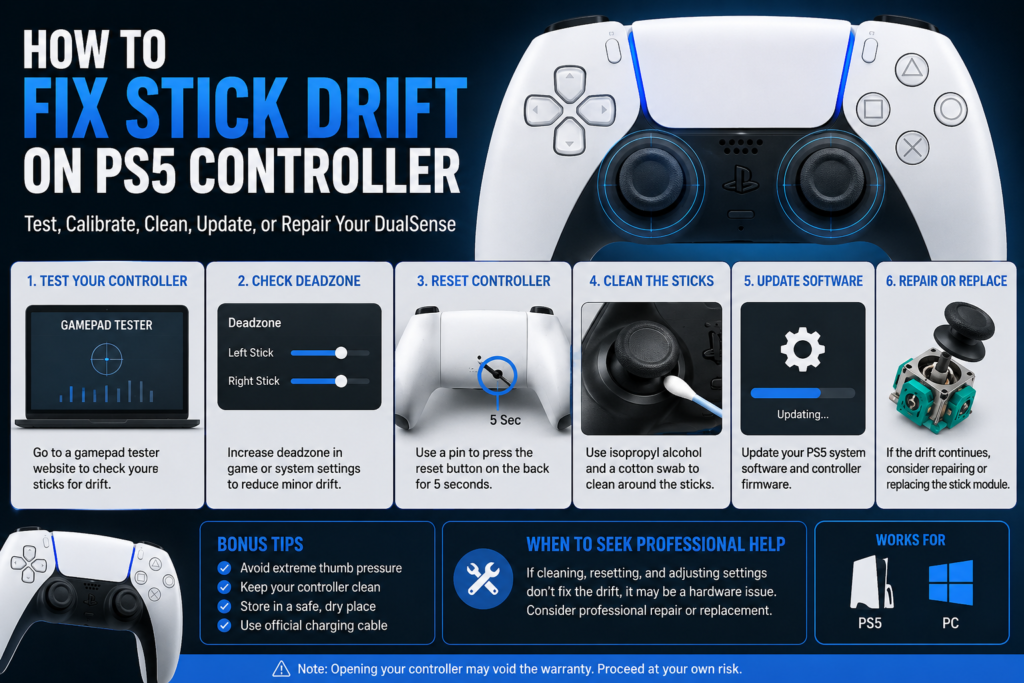
How to Fix Stick Drift on PS5 Controller: If your PS5 controller moves by itself, pulls your aim to one side, or makes your character walk when you are not touching the stick, you may have stick drift. Start by testing the DualSense before opening it. Then try a reset, software update, safe cleaning, and game settings checks. Persistent drift can point to wear inside the analog stick and may need hardware repair.
The best way to handle the problem is simple:
Test → Find the cause → Fix → Test again on Stick drift tester
Test Your PS5 Controller for Stick Drift First
Do not take the controller apart just because your aim moved once in Call of Duty.
Test it first.
A browser-based Gamepad Test can show what the left and right analog sticks are sending while you are touching them and while they are sitting at rest.
Run the Gamepad Test
Connect your DualSense to a computer with USB or Bluetooth. Open the tester and leave both analog sticks alone for a few seconds.
Then:
- Push each stick fully left, right, up, and down.
- Move each stick in a full circle.
- Let go.
- Watch where the input settles.
- Repeat the test with the other stick.
- Remember the direction and behavior so you can compare it after each fix.
Do not panic over tiny momentary movement in a raw input tester. What matters more is repeatable behavior. If an untouched stick stays noticeably displaced, repeatedly pulls in the same direction, or does not return properly after movement, investigate further.
What Does PS5 Stick Drift Look Like on a Gamepad Test?
A controller tester makes it easier to separate a controller problem from a game problem.
| Test behavior | What it may mean |
|---|---|
| Stick settles near its resting center | Normal behavior is more likely |
| Input keeps pulling left or right while untouched | Possible stick drift |
| Input keeps pulling up or down while untouched | Possible stick drift |
| Stick does not return properly after release | Mechanical wear or contamination may be involved |
| One direction has an unusual range | Possible analog-stick hardware issue |
| Tester looks normal but one game moves by itself | Check that game’s deadzone and controller settings |
| Both sticks or unrelated buttons act strangely | Look beyond simple stick drift |
There is no need to use an unofficial percentage and tell every player that anything above that number means the controller is broken.
Use repeatable unwanted input, game behavior, and retesting together.
Is My PS5 Controller Actually Drifting?
Not every unwanted movement is worn analog-stick hardware.
If your character walks by itself, test the left stick first.
If your camera or aim moves by itself, test the right stick first.
If the problem happens only in one game, test the controller outside that game before attempting a repair.
| What you notice | Check first |
|---|---|
| Character walks without input | Left analog stick |
| Sprint stops or stutters | Left stick and game sprint settings |
| Camera slowly turns | Right analog stick |
| Aim pulls to one side | Right analog stick |
| Problem only happens in Warzone | Gamepad Test, then Warzone settings |
| Menu selection moves by itself | Test both sticks |
| Problem appears only over wireless | Compare wired and wireless behavior |
| Stick feels rough or sticks in one direction | Check for dirt or mechanical damage |
This step matters because changing a game setting will not repair worn hardware, while replacing a joystick makes no sense if the controller tests normally outside the game.
What Causes PS5 Controller Stick Drift?
PS5 controller drift can have more than one cause.
Dust or Debris Around the Analog Stick
Dust, residue, hair, and other debris can collect around the thumbstick and inside the stick mechanism.
If contamination affects the moving or sensing parts, cleaning may improve the problem.
That is why some controllers improve after careful cleaning while others do not.
Wear Inside the Joystick
A standard DualSense analog stick uses internal components to measure movement on its axes. One important component is the potentiometer.
Physical wear or damage inside the joystick can create incorrect input even when your thumb is off the stick.
Cleaning can remove dirt.
Cleaning cannot rebuild a physically worn contact surface.
That distinction matters.
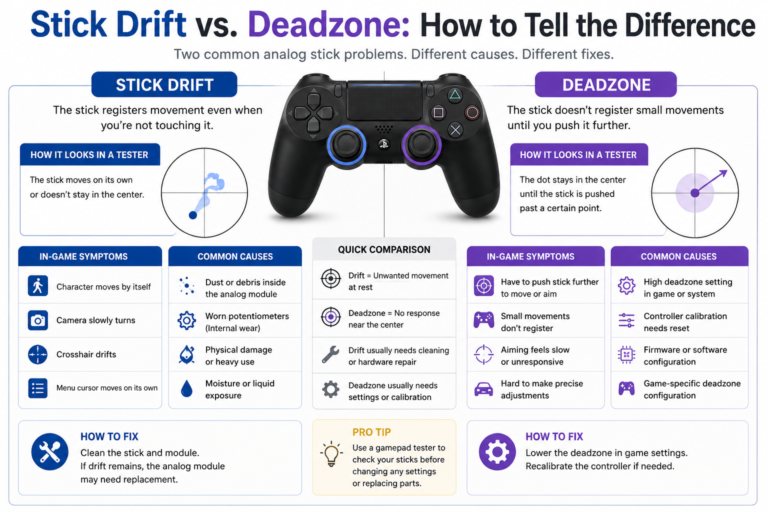
Deadzone and Game Settings
A deadzone is an area around the stick’s resting position that the game ignores.
If a controller produces a small resting offset, increasing the game’s inner deadzone can stop the game from reacting to that input.
But a deadzone is a workaround for the symptom.
It does not physically repair the analog stick.
Using a very large deadzone can also make aiming or movement feel less responsive.
Controller or PS5 Software
Keep your PS5 system software and DualSense controller software up to date before assuming the hardware has failed.
On PS5, check:
Settings > Accessories > Controller (General) > DualSense Wireless Controller Device Software
Software is worth checking before opening the controller or paying for repair.
Drops, Liquid or Internal Damage
A controller that started acting strangely after a hard drop, spill, or other damage needs more caution.
If several buttons, sticks, triggers, or inputs fail at the same time, the problem may be bigger than normal stick drift.
How to Fix PS5 Controller Drift
Start with the lowest-risk fixes.
Test the controller again after each meaningful step.
1. Restart the PS5 and Reconnect the Controller
Turn the console and controller off normally.
Restart the PS5.
Reconnect the DualSense.
Check the problem again.
This can rule out a temporary connection or input problem.
If the drift continues, run the Gamepad Test again.
2. Reset the DualSense Controller
Turn off the PS5.
Disconnect the controller from its USB cable.
Turn the controller over and locate the small reset hole on the back.
Use a pin or similar small tool to press and hold the reset button for at least five seconds.
Connect the controller back to the PS5 with a USB cable and press the PS button.
Now test the stick again.
A reset may help with software-related behavior, but it cannot repair a physically worn joystick.
3. Update Your DualSense Software
Before opening the controller, check for software updates.
Go to:
Settings > Accessories > Controller (General) > DualSense Wireless Controller Device Software
Install any available update.
Restart the controller and test the stick again on controller test .
4. Clean Around the Analog Stick
If the stick feels dirty, rough, or inconsistent, clean the exterior before considering internal work.
Turn the controller off.
Move the affected stick gently through its normal range while checking around the base.
Use a clean, lint-free method to remove visible dirt or debris.
Do not pour liquid into the controller.
If you use an electronics-safe cleaning product, follow its instructions and let the controller dry fully before turning it back on.
Reconnect the controller and perform the same test again.
Do not assume cleaning worked because the stick feels smoother.
Check the input.
5. Check the Game’s Deadzone
If the controller looks mostly normal in a tester but you notice unwanted movement in one game, check that game’s controller settings.
Look for options such as:
Left Stick Minimum Deadzone
Right Stick Minimum Deadzone
Inner Deadzone
Stick Deadzone
Increase the affected stick’s minimum deadzone slowly until the unwanted movement stops.
Do not jump straight to a high value.
A larger deadzone tells the game to ignore more movement near the center.
If you need a very large deadzone just to make the controller usable, investigate the controller itself.
6. Test the Controller Again
Run the same test you performed before troubleshooting.
| Check | Before the fix | After the fix |
|---|---|---|
| Stick while untouched | Record movement | Compare again |
| Left stick movement | Check range and return | Retest |
| Right stick movement | Check range and return | Retest |
| In-game movement | Note the symptom | Compare |
| Deadzone needed | Note previous setting | Check again |
Run the Gamepad Test Again
If the same unwanted input still appears in the same direction, the easy fix probably did not remove the underlying problem.
How to Fix PS5 Controller Drift in Warzone
Warzone controller settings can make a small stick problem much more noticeable.
If your aim pulls left, right, up, or down in Warzone, test the DualSense outside the game first.
If the right stick also moves in the Gamepad Test while untouched, troubleshoot the controller.
If the tester stays stable but your aim moves only in Warzone, check Warzone’s controller and deadzone settings.
The same logic applies to movement.
If your character walks or sprint behavior feels wrong, test the left stick outside Warzone first.
Test Before Changing Warzone Deadzone Settings
The test answers one important question:
Is the controller sending unwanted input, or is Warzone reacting to its settings?
That is more useful than copying another player’s deadzone value.
Different controllers can behave differently.
Does Increasing the Deadzone Fix Stick Drift?
Increasing the deadzone can stop a game from reacting to a small resting offset.
It does not repair the analog stick.
Think of the deadzone tester as a filter.
If the controller produces a small input near the center, the game can ignore that range.
If the drift gets worse, you may need to keep increasing the deadzone, which can eventually affect responsiveness.
Can You Calibrate a PS5 Controller to Fix Stick Drift?
Be careful with the word calibration.
Calibration tools can measure or adjust how stick input is interpreted.
Calibration and hardware repair are not the same thing.
If the analog stick is mechanically healthy but its center or range data is wrong, calibration may help.
If the potentiometer or joystick mechanism is physically worn, calibration cannot restore worn parts.
Test the controller first.
Do not use calibration to hide a hardware problem you have not diagnosed.
What If Cleaning, Resetting and Updating Do Not Work?
If the controller keeps producing the same directional input after testing, resetting, updating, and basic cleaning, internal wear becomes more likely.
At this point you have three practical choices:
Use a small in-game deadzone if the offset is minor and gameplay still feels good.
Have the controller repaired.
Replace the controller if repair does not make financial sense.
For persistent hardware drift on a standard DualSense, joystick repair can require soldering.
That is where basic troubleshooting becomes electronics repair.
Can You Replace the Analog Stick in a Standard DualSense?
Yes, but it is not a simple plug-in replacement.
Standard DualSense joystick replacement can require desoldering the existing joystick module and soldering in a new one.
If you already repair electronics and have the right equipment, module replacement may make sense.
If you have never desoldered a multi-pin component from a circuit board, a drifting controller is not a good place to learn through trial and error.
Potentiometer Repair vs Full Joystick Replacement
Not every repair requires the same parts.
If contamination is the problem, cleaning may help.
If one sensing component has failed, an experienced repairer may replace the affected part.
If the whole joystick mechanism is worn or damaged, replacing the full joystick assembly may make more sense.
The right repair depends on what actually failed.
That is why testing before opening the controller saves time.
What About Hall Effect or TMR Joysticks?
You may see repair shops advertising Hall effect or TMR replacement sticks.
Traditional potentiometer-based sticks use physical contact inside their sensing components.
Hall effect and TMR designs use magnetic sensing, which avoids that specific resistive-track wear mechanism.
That does not mean a controller with magnetic sticks can never develop input problems.
Other components can still wear, become damaged, fall out of calibration, or fail.
Installation and calibration quality matter.
DualSense Edge Stick Drift Is Different
Do not follow standard DualSense hardware advice blindly if you own a DualSense Edge.
The DualSense Edge was designed with replaceable stick modules.
That means a faulty Edge stick module can be removed and replaced without desoldering the joystick from the controller’s main board.
Replace a DualSense Edge Stick Module
Turn the controller off and disconnect the USB cable.
Open the Edge controller’s front cover using its release mechanism.
Lift the stick-module release lever.
Remove the affected module.
Install the replacement module.
Lower the release lever and reinstall the cover.
Test the new module afterward.
Check DualSense Edge Stick Settings Too
DualSense Edge also gives you more control over stick sensitivity and deadzone settings.
Check the active controller profile before assuming the module itself needs replacement.
When Should You Stop DIY Controller Repair?
Stop before opening the controller further if you see:
- Liquid damage
- Corrosion
- Torn ribbon cables
- Broken connectors
- Burnt components
- Circuit-board damage
- Several controls failing at once
You should also consider professional repair if the job requires soldering and you do not already know how to desolder and install components safely.
A bad repair attempt can turn a fixable stick problem into a damaged controller.
Check warranty eligibility before modifying a controller that may still qualify for support.
Will Sony Fix PS5 Controller Stick Drift?
If basic troubleshooting does not solve the problem, check PlayStation Repairs.
A controller that is still covered by Sony’s warranty may qualify for service depending on the cause of the problem and the warranty conditions.
In the United States, keep your proof of purchase available when checking warranty eligibility.
Do not open a controller that may still qualify for warranty service before checking your options.
Where Can I Get PS5 Controller Drift Fixed Near Me?
If you are in the United States and do not want to solder a joystick yourself, look for a local shop that specifically handles game-console or controller repair.
Before leaving the controller, ask what the quoted service includes.
Ask whether they will:
- Clean the stick
- Replace a potentiometer
- Replace the full joystick module
- Install Hall effect or TMR sticks
- Calibrate the controller
- Test it after repair
- Provide a repair warranty
Compare the final repair price with the cost of replacing the controller.
If the controller may still be under warranty, check PlayStation support first.
Should I Repair or Replace a Drifting PS5 Controller?
Use the cause to make the decision.
| Situation | Best next move |
|---|---|
| Tester looks normal and problem happens in one game | Check game settings |
| Small offset controlled by a reasonable deadzone | Keep using it and monitor |
| Dirt appears to affect movement | Clean safely and retest |
| Software problem suspected | Reset and update |
| Drift remains after basic troubleshooting | Get a repair quote |
| Standard DualSense needs joystick replacement | Compare repair and replacement cost |
| DualSense Edge module is faulty | Replace the stick module |
| Controller may still be under warranty | Check Sony support first |
| Liquid or board damage is present | Get professional diagnosis |
| Several controller parts are failing | Compare total repair cost with replacement |
Do not replace a controller just because one game feels strange.
Do not open it before confirming that the hardware is actually producing unwanted input.
Can Cleaning Permanently Fix PS5 Stick Drift?
Sometimes.
If dirt or residue is interfering with the stick mechanism, cleaning may solve the problem.
If internal sensing components are physically worn, cleaning cannot restore the worn material.
That is why one controller may work normally after cleaning while another starts drifting again.
Test the controller after cleaning instead of assuming the problem is fixed.
How to Reduce the Chance of Stick Problems Returning
Keep your controller clean.
Store it where the analog sticks are not pressed against other objects.
Avoid flooding the area around the sticks with liquid cleaners.
Do not throw the controller into a bag where pressure stays on a thumbstick for hours.
Keep the controller software updated.
If movement starts feeling wrong, test the controller early instead of hiding the problem with an increasingly large deadzone.
PS5 Controller Drift Fix Checklist
Use this order before buying another controller:
1. Test the controller
2. Identify the affected stick
3. Check whether the problem happens outside the game
4. Restart and reconnect
5. Reset the DualSense
6. Update controller software
7. Clean around the stick safely
8. Check game deadzone settings
9. Run the same Gamepad Test again
10. Consider repair, Sony support, or replacement if unwanted input remains
FAQS
How do I know if my PS5 controller has stick drift?
Connect the DualSense to a controller tester and leave the sticks untouched. If one stick repeatedly produces unwanted directional input or does not settle properly after release, test it again in another game or environment. Repeatable unwanted input across different tests makes controller drift more likely.
How can I test PS5 controller stick drift online?
Connect the DualSense to your computer through USB or Bluetooth and open a Gamepad Tester in a supported browser. Watch the left and right stick input while they are untouched, move each stick through its range, release it, and check how the input returns.
Why does my PS5 controller move by itself?
The cause may be analog-stick drift, game deadzone settings, software, connection behavior, contamination, or hardware damage. Test the controller outside the game first to see whether the DualSense itself is producing the movement.
Does resetting a PS5 controller fix stick drift?
It can help if the problem is related to the controller’s software state, but it cannot repair worn joystick hardware. Reset the DualSense and test it again before moving to hardware repair.
Can cleaning fix PS5 controller stick drift?
Yes, if dirt or contamination is causing the problem. Cleaning may not help when internal components are physically worn. Always retest after cleaning.
Can you calibrate a PS5 controller?
Calibration tools can adjust how stick input is interpreted, but calibration cannot repair physically worn joystick parts. Test the controller first and identify whether the problem is calibration, settings, or hardware.
Does increasing the deadzone fix PS5 stick drift?
Increasing the deadzone can stop a game from reacting to a small resting offset, but it does not physically repair the analog stick.
Why does my PS5 controller drift only in Warzone?
Test the controller outside Warzone. If the stick remains stable in a Gamepad Test but movement appears only in Warzone, check Warzone’s controller and deadzone settings. If the same unwanted input appears in the tester, troubleshoot the controller itself.
Can PS5 controller stick drift be permanently fixed?
It depends on the cause. Cleaning may solve contamination-related problems. Settings can hide small offsets. Persistent drift caused by worn joystick hardware may require component or joystick-module replacement.
Does DualSense Edge get stick drift?
A DualSense Edge stick module can develop input problems, but the Edge is designed with replaceable stick modules. You can replace the affected module without desoldering a joystick from the main board.
Can I replace a DualSense Edge stick myself?
Yes. DualSense Edge stick modules are designed to be user replaceable. Remove the affected module using the controller’s release system, install the replacement, and test it afterward.
Is replacing a standard DualSense joystick easy?
Not for most beginners. Standard DualSense joystick replacement can require desoldering and soldering the module to the controller board.
Where can I get my PS5 controller fixed near me?
Search for a local game-console or controller repair specialist. Ask whether they perform joystick-module or potentiometer repairs, calibration, and post-repair testing. If the controller may still be covered by Sony’s warranty, check PlayStation support first.
Is it cheaper to repair or replace a drifting PS5 controller?
It depends on the failed part and local labor cost. Basic cleaning can cost very little, while joystick-module or board repair requires more work. Compare the complete repair quote with the current price of a replacement controller.
Will Sony repair a PS5 controller with stick drift?
Sony provides PlayStation repair support for unresolved controller problems. Whether the repair is covered depends on warranty eligibility, the cause of the problem, and the warranty terms.
How This Guide Was Verified
This guide was checked against current PlayStation support information for DualSense reset procedures, controller software updates, DualSense Edge stick modules, and repair support. Hardware troubleshooting was cross-checked with established controller-repair guidance. Community reports were used only to understand real user experiences and were not treated as guaranteed repair results.
2 Comments